Instructions for use
ALARM | SMOKE ALARM | POOL | MUSIC | BBQ
ALARM
IMPORTANT : When leaving the house, please ensure that all doors and windows are closed. Also, keep the gate closed at all times. This prevents unwanted visitors from entering the property.
Activating the security alarm:
-
Touch the screen and press the red lock icon.
-
Enter the code provided by Miracola or by us.
-
Confirm with the green check mark.
-
Press the red lock icon again.
Deactivating the security alarm:
-
Touch the screen and press the green lock icon.
-
Enter the code provided.
-
Confirm with the green check mark.
-
Press the green lock icon again.
SMOKE ALARM
There are smoke detectors in every room. If a smoke detector goes off, simply turn it off. Wait until the smoke clears before reattaching it.
HOW TO KEEP THE SWIMMING POOL AND SKIMMERS CLEAN
Our pool is open from May through September.
We have a fully automatic system, so no technician needs to visit during your stay, allowing you to fully enjoy the peace and quiet. The water is pumped from our own well.
Through a water purification system, water is sent to the sand filter in the technical room. The pH level is automatically regulated by a pH meter, and chlorine is generated through electrolysis. We do not use additional chlorine.
To ensure the pool pump works properly, the skimmers must be cleaned daily.
We kindly ask guests to do the following:
-
Remove the baskets from the skimmers by twisting them so they come out easily.
-
Pay attention to the notch before pulling them out (see photo).
-
Empty the baskets and put them back in the skimmers.
-
Do this daily to keep the pump working efficiently.
-
If too much debris or leaves block the skimmer outlets, water flow may stop, preventing fresh water from circulating in the pool.
-
Use the net if there is too much debris on the bottom. We recommend running the pool robot regularly (every 2 days). The robot is located on the terrace by the pool, along with instructions. Do not leave the robot in direct sunlight.
-
Lighting / Pool lights: The pool is equipped with LED lights that operate on an automatic timer.
SONOS speakers
-
By downloading the "Sonos" app, you can easily control the music system.
-
The white indoor speakers on stands must remain indoors and should not be moved. They are set up for the room and operate via Wi-Fi.
-
The black “Move” speaker can be taken outside, as long as it is not in direct sunlight and is returned indoors at night or when leaving the house. It works via Bluetooth outdoors. Use the button on the back to switch settings from Wi-Fi to Bluetooth.
FEUERRING (Ofyr)
-
Start by placing small pieces of wood and then some larger wood or charcoal on top to make a proper fire.
-
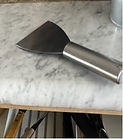
Apply some oil—peanut oil (arachide oil) works best (see photo 1). Do not use olive oil (too thick). You can use paper and the OFYR spatula (photo 2).
-
For best results: make sure the charcoal is positioned under the edges. Use the metal spatula (photo 3) for this.
-
Once heated, the ring retains its heat for a long time. You can cook meat, vegetables, potatoes, etc. on it.
-
After use:
-
Scrape off food residues with a spatula and kitchen paper.
-
Use a metal brush and dustpan to remove the ash.
-
Reapply some oil to the ring.
-
Do not use metal sponges, soap, water, or sandpaper to clean the ring!
-
Enjoy your meal!


Thank you for taking this into account.